WebGL Programming
COS 350 - Computer Graphics
Show-and-Tell
How do we make things move?
Rotating Cube
Traditional OpenGL — static image
display();
while(1) // event "loop"
    blocking_function_call();
Rotating Cube
display() defined as "idle function"
idle: no events to handle, but process has CPU
Rotating Cube
cube.html
<html>
<style type="text/css">
    canvas { background: blue; }
</style>

<script id="vertex-shader" type="x-shader/x-vertex">

attribute  vec4 vPosition;
attribute  vec4 vColor;
varying vec4 fColor;

uniform vec3 theta;

void main() {
    // Compute the sines and cosines of theta for each of
    //   the three axes in one computation.
    vec3 angles = radians( theta );
    vec3 c = cos( angles );
    vec3 s = sin( angles );

    // Remeber: thse matrices are column-major
    mat4 rx = mat4( 1.0,  0.0,  0.0, 0.0,
                    0.0,  c.x,  s.x, 0.0,
                    0.0, -s.x,  c.x, 0.0,
                    0.0,  0.0,  0.0, 1.0 );

    mat4 ry = mat4( c.y, 0.0, -s.y, 0.0,
                    0.0, 1.0,  0.0, 0.0,
                    s.y, 0.0,  c.y, 0.0,
                    0.0, 0.0,  0.0, 1.0 );


    mat4 rz = mat4( c.z, -s.z, 0.0, 0.0,
                    s.z,  c.z, 0.0, 0.0,
                    0.0,  0.0, 1.0, 0.0,
                    0.0,  0.0, 0.0, 1.0 );

    fColor = vColor;
    gl_Position = rz * ry * rx * vPosition;
}
</script>

<script id="fragment-shader" type="x-shader/x-fragment">

precision mediump float;

varying vec4 fColor;

void main() {
    gl_FragColor = fColor;
}
</script>

<script type="text/javascript" src="angel_common/webgl-utils.js"></script>
<script type="text/javascript" src="angel_common/initShaders-2.js"></script>
<script type="text/javascript" src="angel_common/MV.js"></script>
<script type="text/javascript" src="cube.js"></script>

<body>
    <canvas id="gl-canvas" width="512" height="512">
        Oops ... your browser doesn't support the HTML5 canvas element
    </canvas>

    <br/>

    <button id= "xButton">Rotate X</button>
    <button id= "yButton">Rotate Y</button>
    <button id= "zButton">Rotate Z</button>

</body>

<!-- Mirrored from www.cs.unm.edu/~angel/BOOK/INTERACTIVE_COMPUTER_GRAPHICS/ SIXTH_EDITION/CODE/WebGL/7E/04/cube.html by HTTrack Website Copier/3.x [XR&CO'2010], Fri, 23 Aug 2013 18:49:22 GMT -->
</html>
cube.js
var canvas;
var gl;

var NumVertices  = 36;

var points = [];
var colors = [];

var xAxis = 0;
var yAxis = 1;
var zAxis = 2;

var axis = 0;
var theta = [ 30, 30, 30 ];

var thetaLoc;

window.onload = function init()
{
    canvas = document.getElementById( "gl-canvas" );

    gl = WebGLUtils.setupWebGL( canvas );
    if ( !gl ) { alert( "WebGL isn't available" ); }

    colorCube();

    gl.viewport( 0, 0, canvas.width, canvas.height );
    gl.clearColor( 1.0, 1.0, 1.0, 1.0 );

    gl.enable(gl.DEPTH_TEST);

    //
    //  Load shaders and initialize attribute buffers
    //
    var program = initShaders( gl, "vertex-shader", "fragment-shader" );
    gl.useProgram( program );

    var cBuffer = gl.createBuffer();
    gl.bindBuffer( gl.ARRAY_BUFFER, cBuffer );
    gl.bufferData( gl.ARRAY_BUFFER, flatten(colors), gl.STATIC_DRAW );

    var vColor = gl.getAttribLocation( program, "vColor" );
    gl.vertexAttribPointer( vColor, 4, gl.FLOAT, false, 0, 0 );
    gl.enableVertexAttribArray( vColor );

    var vBuffer = gl.createBuffer();
    gl.bindBuffer( gl.ARRAY_BUFFER, vBuffer );
    gl.bufferData( gl.ARRAY_BUFFER, flatten(points), gl.STATIC_DRAW );

    var vPosition = gl.getAttribLocation( program, "vPosition" );
    gl.vertexAttribPointer( vPosition, 3, gl.FLOAT, false, 0, 0 );
    gl.enableVertexAttribArray( vPosition );

    thetaLoc = gl.getUniformLocation(program, "theta");

    //event listeners for buttons

    document.getElementById( "xButton" ).onclick = function () {
        axis = xAxis;
    };
    document.getElementById( "yButton" ).onclick = function () {
        axis = yAxis;
    };
    document.getElementById( "zButton" ).onclick = function () {
        axis = zAxis;
    };

    render();
}

function colorCube()
{
    quad( 1, 0, 3, 2 );
    quad( 2, 3, 7, 6 );
    quad( 3, 0, 4, 7 );
    quad( 6, 5, 1, 2 );
    quad( 4, 5, 6, 7 );
    quad( 5, 4, 0, 1 );
}

function quad(a, b, c, d)
{
    var vertices = [
        vec3( -0.5, -0.5,  0.5 ),
        vec3( -0.5,  0.5,  0.5 ),
        vec3(  0.5,  0.5,  0.5 ),
        vec3(  0.5, -0.5,  0.5 ),
        vec3( -0.5, -0.5, -0.5 ),
        vec3( -0.5,  0.5, -0.5 ),
        vec3(  0.5,  0.5, -0.5 ),
        vec3(  0.5, -0.5, -0.5 )
    ];

    var vertexColors = [
        [ 0.0, 0.0, 0.0, 1.0 ],  // black
        [ 1.0, 0.0, 0.0, 1.0 ],  // red
        [ 1.0, 1.0, 0.0, 1.0 ],  // yellow
        [ 0.0, 1.0, 0.0, 1.0 ],  // green
        [ 0.0, 0.0, 1.0, 1.0 ],  // blue
        [ 1.0, 0.0, 1.0, 1.0 ],  // magenta
        [ 1.0, 1.0, 1.0, 1.0 ],  // white
        [ 0.0, 1.0, 1.0, 1.0 ]   // cyan
    ];

    // We need to parition the quad into two triangles in order for
    // WebGL to be able to render it.  In this case, we create two
    // triangles from the quad indices

    //vertex color assigned by the index of the vertex

    var indices = [ a, b, c, a, c, d ];

    for ( var i = 0; i < indices.length; ++i ) {
        points.push( vertices[indices[i]] );
        colors.push( vertexColors[indices[i]] );

        // for solid colored faces use
        //colors.push(vertexColors[a]);

    }
}

function render()
{
    gl.clear( gl.COLOR_BUFFER_BIT | gl.DEPTH_BUFFER_BIT);

    theta[axis] += 2.0;
    gl.uniform3fv(thetaLoc, theta);

    gl.drawArrays( gl.TRIANGLES, 0, NumVertices );

    requestAnimFrame( render );
}
Shader uniform variables
Variables that are the same for every vertex (is not interpolated) and are available to vertex and fragment shaders
Example:
- transformation matrix
- light position
ModelView matrix
Handles transformations of model and of view by changing coordinate spaces from
| Local Model => World => Local View |
Categories of matrices:
- translation
- rotation
- scaling
Performed by matrix multiplication (linear algebra!)
Projection matrix
Transforms from 3D space to 2D space, so we can see it on the monitor
(also performed by matrix multiplication)
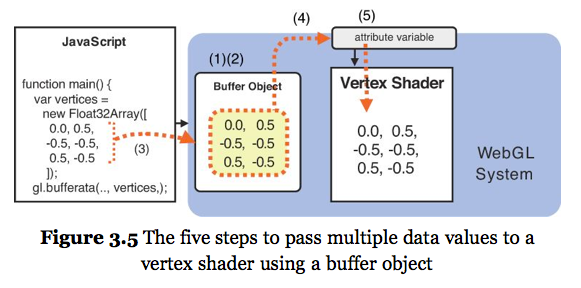
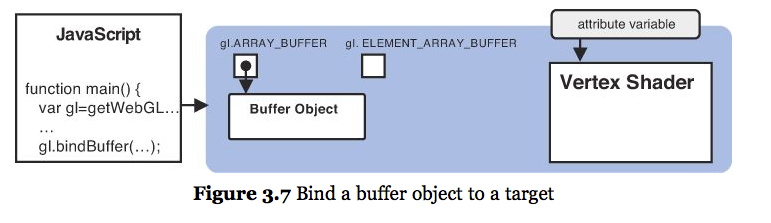
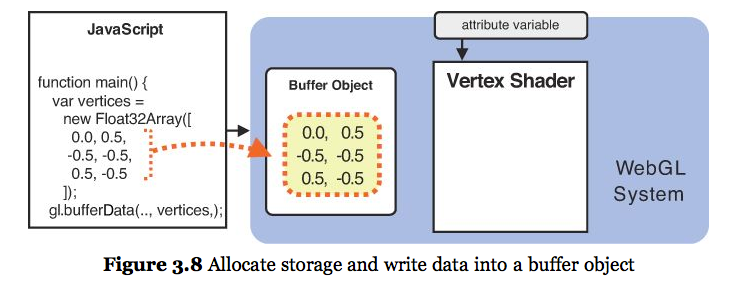
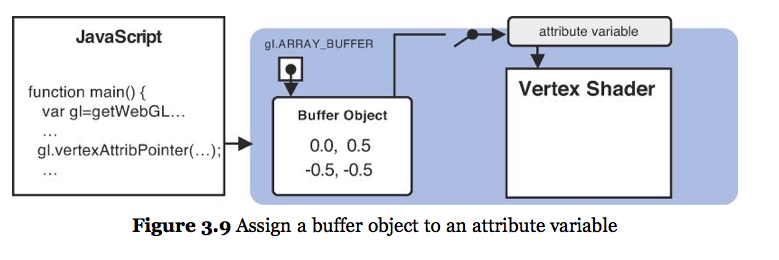
shader attribute variables
An attribute associated with a vertex that is available only to vertex shader
- position
- color
- normal
shader varying variables
Variables that allowing passing from vertex shader to fragment shader
Values are interpolated across the primitive
shader built-in variables
These variables begin with gl_
Built-in attribute variables: gl_Vertex, gl_Normal, gl_Color, gl_MultiTexCoordX
Built-in uniform variables: gl_ModelViewMatrix, gl_ModelViewProjectionMatrix, gl_NormalMatrix
Built-in varying variables: gl_FrontColor, gl_BackColor, gl_TexCoord[X]
Built-ins used for shader output: gl_Position, gl_FragColor, gl_FragDepth
shader variables
shader variables

shader variables
shader variables
shader variables
shader variables
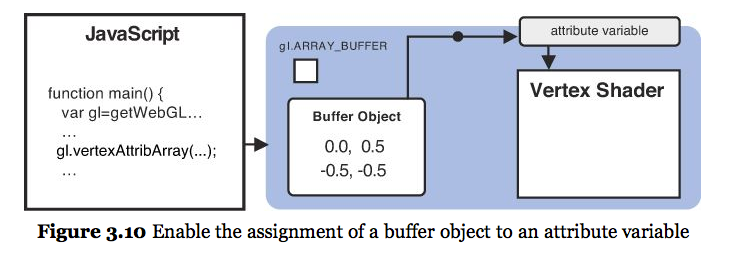
Data Flow
- vertex shader
uniformandattributevariables
- fragment shader
uniformandvaryingvariablesvaryingis interpolated

Efficiency
Object data and colors transferred from the CPU to GPU once
Arithmetic to transform points is done on GPU for each frame